Buying Guide
Take card payments on the Android phone you already own
The haircut is done, and now payment means a walk to a card reader at the front, or digging a separate machine out of a drawer, while the next person is already waiting. This guide from NextUp Walk-in shows how a barbershop can take in-person card payments on the Android phone already in a barber’s pocket. Tap to Pay on Android is available now in the NextUp app: once your Stripe account is connected, the customer taps their contactless card or phone on yours. No reader to buy, pair or charge.
What Tap to Pay on Android is, and what you need
The barber’s Android phone is the reader. In the NextUp app, Tap to Pay on Android takes a contactless card or phone at the chair, with nothing extra to buy, pair or charge. It is a feature of the NextUp app, and checkout and card payments are on every plan, Free included, at the same card fee.
Get the NextUp app on Google Play and sign in. Connect your business’s Stripe account on the Payouts page. You need an NFC Android phone running Android 8 or later. Stripe decides which phones can take it, and the NextUp app only shows the Tap to Pay tab on a phone that passed those checks.
Owners and managers can take Tap to Pay. The owner can turn it on for a team member.
What you need for Tap to Pay on Android
| An NFC Android phone | Android 8 or later. Stripe decides which phones can take it, and the NextUp app only shows Tap to Pay on a phone that can. |
|---|---|
| The NextUp app | Download it from Google Play. It is available now for Android phones and tablets. |
| Your Stripe account | Connect your business’s Stripe account on the Payouts page before you take a card. |
| Someone who can take payments | Owners and managers always can. The owner can turn Tap to Pay on for a team member. |
How a walk-in barbershop takes in-person card payments in the NextUp app, with no reader.
How you take a card payment at the chair
Open the bill in Checkout. You can open it from the Checkout page, with Take payment in the + menu at the top of every page, or from Checkout on the Staff Screen.
If this phone can take it, a tab labeled Tap to Pay appears with the other ways to pay, such as Pay link / QR, Cash, and Card reader when you have one.
The client chooses a tip with you on that screen, then taps their contactless card or phone on yours. Press the Tap to Pay button, which shows the amount, and the phone asks them to hold the card or phone where your phone shows.
You can also press Split this bill and take one share with Tap to Pay, with the tip on that share, then pay the rest another way.
See it on your own line
Free needs no card: pick it at sign-up. The 14-day trial has every Pro feature, once per business. A card is needed to start, but nothing is charged until the trial ends, when the plan is charged unless you cancel first.
Tips, a card reader if you want one, and a receipt
The tip is chosen in Checkout before the customer taps. If they already left a cash tip, you can take the card payment with no tip on it, or ask for a tip on this payment too. NextUp Walk-in never charges its card fee on tips.
A card reader is optional. A Stripe S700 at the counter lets the customer pick a tip on the reader, then tap, insert or swipe. A Stripe M2 pairs over Bluetooth to a team member’s phone in the NextUp app, to take a card at the chair. Readers are bought from Stripe, and NextUp Walk-in makes nothing on the hardware. See card readers.
If the customer wants to pay on their own phone, use Pay link / QR. You can send a receipt for a paid bill, however it was paid.
The same phone also runs your walk-in line
The same NextUp app that takes the card also runs the line: call the next person, add a walk-in at the chair, and mark a no-show, without walking to the front. Visit texts are on paid plans only, for customers who agree.
Our guides to the walk-in waitlist app for Android and the iPhone and iPad app cover the door tablet, the Staff Screen and the lobby TV. A lobby TV app is available now for Roku, Fire TV, Apple TV and Google TV.
The line on your phone, then the card at the chair
The NextUp app
- The NextUp app for Android phones and tablets, available now on Google Play.
- Customers join from a QR code, no app and no account, and watch their place on their own phone.
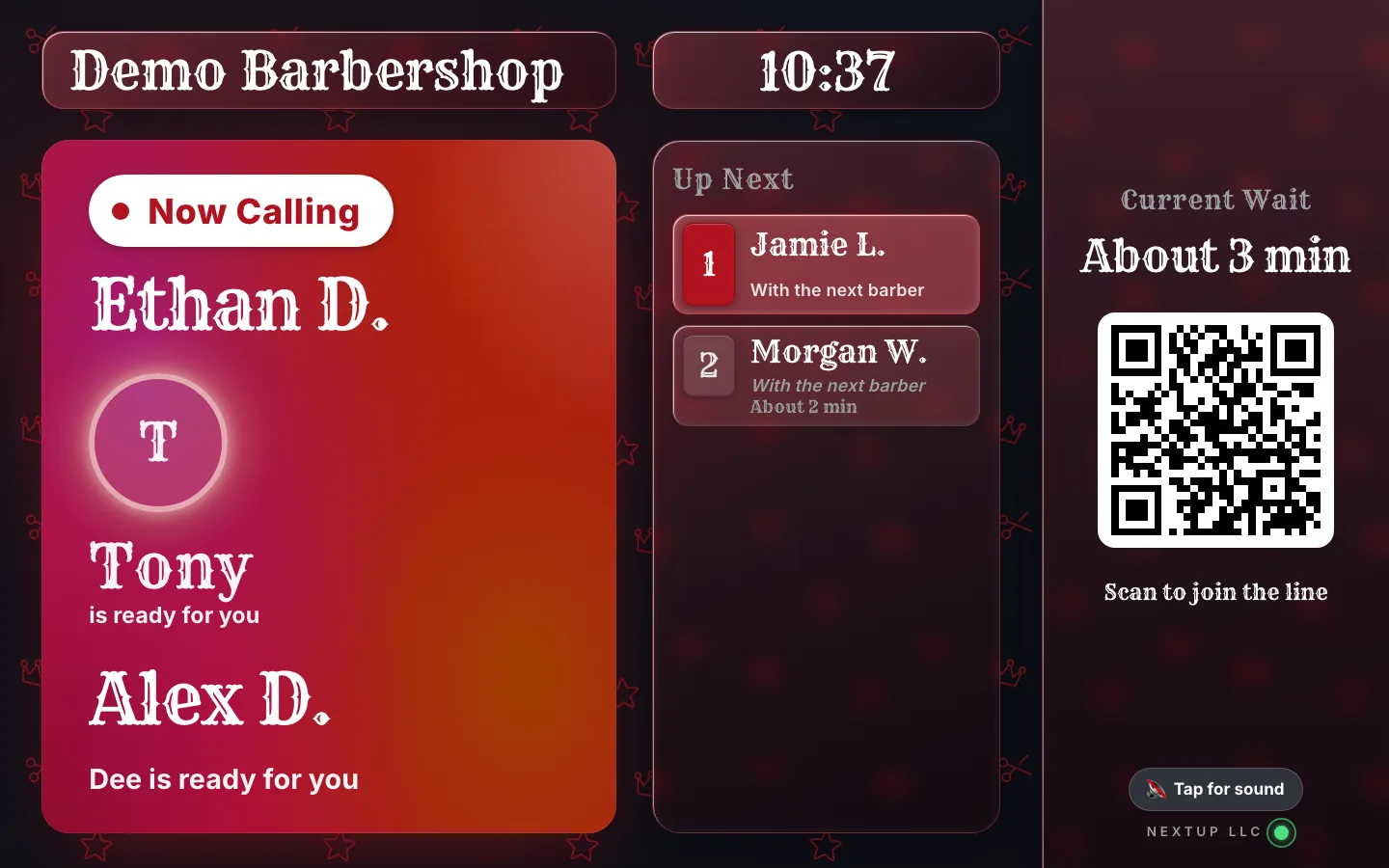
- When it is someone’s turn, their first name and last initial come up on the lobby TV, so nobody has to shout across a full shop.
- Then you take the card at the chair with Tap to Pay on Android, no reader needed.
- Every screen, plus checkout and card payments, included on every plan, Free included.
Free needs no card: pick it at sign-up. The 14-day trial has every Pro feature, once per business. A card is needed to start, but nothing is charged until the trial ends, when the plan is charged unless you cancel first.
Plans and card fees
The Free plan includes every screen, plus checkout and card payments, including Tap to Pay on Android: 1 location, 1 team member and 50 check-ins a month, no card needed. When you add your team or outgrow 50 check-ins, Walk-in starts at $29 a month for your first location and includes 3 team members, then $10 a month for each extra, and $19 a month for each extra location. Every paid plan starts with a 14-day free trial with every Pro feature, once per business. A card is needed to start, but nothing is charged until the trial ends, when the plan is charged unless you cancel first.
NextUp Walk-in’s card fee is 0.5% of card payments, never on tips, at most $1 a payment, on top of Stripe’s processing fee. The same fee applies on every plan, with a reader or without. Stripe charges 2.7% + 15¢ for Tap to Pay on Android (its in-person rate plus 10¢ a tap), to the shop’s own account. Checked Nov 19, 2026. Stripe’s current US rates are listed on our pricing page.
Take the next card at the chair
Take the card at the chair, on the phone you already have.
Start a 14-day trial, or pick Free at sign-up, then add the NextUp app from Google Play and connect Stripe.
Free needs no card: pick it at sign-up. The 14-day trial has every Pro feature, once per business. A card is needed to start, but nothing is charged until the trial ends, when the plan is charged unless you cancel first.
Questions
Can a barbershop take Tap to Pay on Android?
Yes. In the NextUp app from NextUp Walk-in, once your Stripe account is connected, a team member’s NFC Android phone takes the contactless card or phone. No reader is needed. Checkout and card payments, including Tap to Pay on Android, are on every plan, Free included.
Do I need a card reader to take card payments?
No. Tap to Pay on Android uses the shop’s own Android phone in the NextUp app. A card reader is optional: a Stripe S700 at the counter, or a Stripe M2 paired to a phone in the app. Readers are bought from Stripe.
Is Tap to Pay on Android on the Free plan?
Yes. Checkout and card payments, including Tap to Pay on Android, are on every plan, Free included, at the same card fee. The Free plan is 1 location, 1 team member and 50 check-ins a month, with no card at sign-up.
What fees do I pay on a Tap to Pay payment?
NextUp Walk-in’s card fee is 0.5% of card payments, never on tips, at most $1 a payment, on top of Stripe’s processing fee. The same fee applies on every plan, with a reader or without. Stripe charges 2.7% + 15¢ for Tap to Pay on Android (its in-person rate plus 10¢ a tap), to the shop’s own account. Checked Nov 19, 2026. Stripe’s current US rates are listed on the pricing page.
Which Android phones can take Tap to Pay?
You need an NFC Android phone running Android 8 or later. Stripe decides which phones can take it, and the NextUp app only shows the Tap to Pay tab on a phone that can.
Do my customers need to download an app to pay?
No. They tap their contactless card or phone on yours. They can also pay on their own phone from a pay link or QR code, with no app required. The NextUp app is for you and your team.
iPhone, iPad, Android and TV
Get the NextUp app
Run your line from your phone, wherever you are in the shop. Free for iPhone, iPad and Apple TV on the App Store, and for Android phones, tablets and Google TV on Google Play.

Ready to try it?
NextUp Walk-in is a walk-in queue for barbershops, salons, restaurants, and service shops. Customers join from the phone they already have. No app required. The trial is 14 days, with every Pro feature.