Operations
Black Friday barbershop walk-ins, without a packed lobby
Black Friday morning, and the sidewalk is already a second line. Every "how long?" stops a fade, and the clipboard at the door cannot cap the line or tell someone in the parking lot they are next. This guide from NextUp Walk-in is how to run a barbershop walk-in queue through Thanksgiving weekend and Black Friday, November 26 to 28, 2026. Set a cap, close the line on time, and let people wait on their phone until their name comes up on the lobby TV.
What this weekend asks of a barbershop
Thanksgiving is Thursday, November 26, 2026. Black Friday is November 27, and Small Business Saturday is November 28.
People want a cut close to the table, then close to going out. That packs walk-ins into a few days, not the whole month, and a paper list cannot keep up: it cannot stop new names when you are full, and it cannot show a live wait to someone who is not standing in the lobby.
This post is the weekend at the chairs. For the wider plan from Thanksgiving through New Year’s, including hours, gift cards and the weeks around Christmas, start with our holiday rush plan for walk-in shops. Families who arrive together are covered in family haircuts before Thanksgiving. Saturday’s first-timers have their own Small Business Saturday plan.
Thanksgiving weekend at the chairs, 2026
| Nov 25 | Wednesday | Day before Thanksgiving | People often come in before they travel. Keep the cap and the TV on. |
|---|---|---|---|
| Nov 26 | Thursday | Thanksgiving | Open or closed. If you are open, set a close lead time so the last cut can finish. |
| Nov 27 | Friday | Black Friday | Cap the line, quote the live wait, and take payment at the chair. |
| Nov 28 | Saturday | Small Business Saturday | First-timers show up with shopping bags. See our Small Business Saturday plan. |
Dates for 2026, U.S. calendar. Wednesday is the day before Thanksgiving, not part of the weekend itself.
Set the line up before Wednesday
Do the setup on a quiet day, so the weekend runs itself.
- Write the hours for each date, even the ones that match your usual hours, and put them on the door, your website and Google the same day. Our holiday hours guide walks through Special hours on Google Business Profile.
- Put the QR in the window with our free QR window sign, so a walk-in can join from the sidewalk or the car.
- Stand a tablet by the door for anyone who walks straight in. The Door Tablet is on every plan, Free included.
- Turn on the lobby TV. When you call the next person, their first name and last initial come up on the screen. The TV display is on the Free plan.
- Set a line cap: the maximum number of people waiting, from 1 to 500, or leave it at no limit. When the line reaches the cap, online check-in pauses. People who try to join from the QR code, your link or the Door Tablet see that you are at capacity and should check back soon. Joining opens again on its own as you serve people.
- Turn on "Close for walk-ins automatically" and, if you need to stop early, set a close lead time (up to 240 minutes before closing) so the last cut can finish. People already in line stay in line. Staff can still add someone by hand on the Staff Screen. Our guide to the last walk-in before closing covers the same rule in more detail.
- Run a test join from the door to the Staff Screen and the TV before the weekend starts.
Run the line on the day
One line, one wait, and nobody has to guard the door.
Walk-ins scan the QR or use the Door Tablet, type a name, and their phone shows their place and an honest wait range. No app and no account. They can wait in the car, next door, or at home, and come back when they are close.
You call the next person from the Staff Screen. Their page changes to "You’re up!" and "Come have a seat in the chair.", and their first name and last initial come up on the lobby TV. If plans change, "Can’t make it?" takes them out of the line in one tap.
On paid plans, customers who agree to texts also get a text confirming their spot and another when it is their turn. Free has no texts, and the page on their phone works either way.
A parent who walks in with kids can put the whole crew on one ticket with "Add someone": up to 5 people, each with their own service and barber, or Anyone, served one by one. The line cap counts every person, so a family of three needs three open places. Family tickets are on the Walk-in plan; they are not on Free. The full walkthrough is in family haircuts before Thanksgiving.
If you need to stop new joins before the scheduled close, switch the location to Closed. Customers who try to join then see that the shop is not taking walk-ins right now. The schedule will not undo that until the next day.
See it on your own line
Free needs no card: pick it at sign-up. The 14-day trial has every Pro feature, once per business. A card is needed to start, but nothing is charged until the trial ends, when the plan is charged unless you cancel first.
Black Friday without a packed lobby
The hard part of Black Friday is not the haircut. It is the lobby. Chairs are mid-fade, the bench is full, and every new face at the door wants a time you do not have in your head.
A line cap stops the overflow before it starts. A live wait on each person’s phone means they do not have to stand in the room to keep their place. The lobby TV answers "who is next?" without pulling a barber off a cut.
When the cut is done, take payment at the chair. Checkout and card payments are on every plan, Free included, including Tap to Pay on Android: once your Stripe account is connected, the shop’s own NFC Android phone takes in-person card payments in the NextUp app, no reader needed.
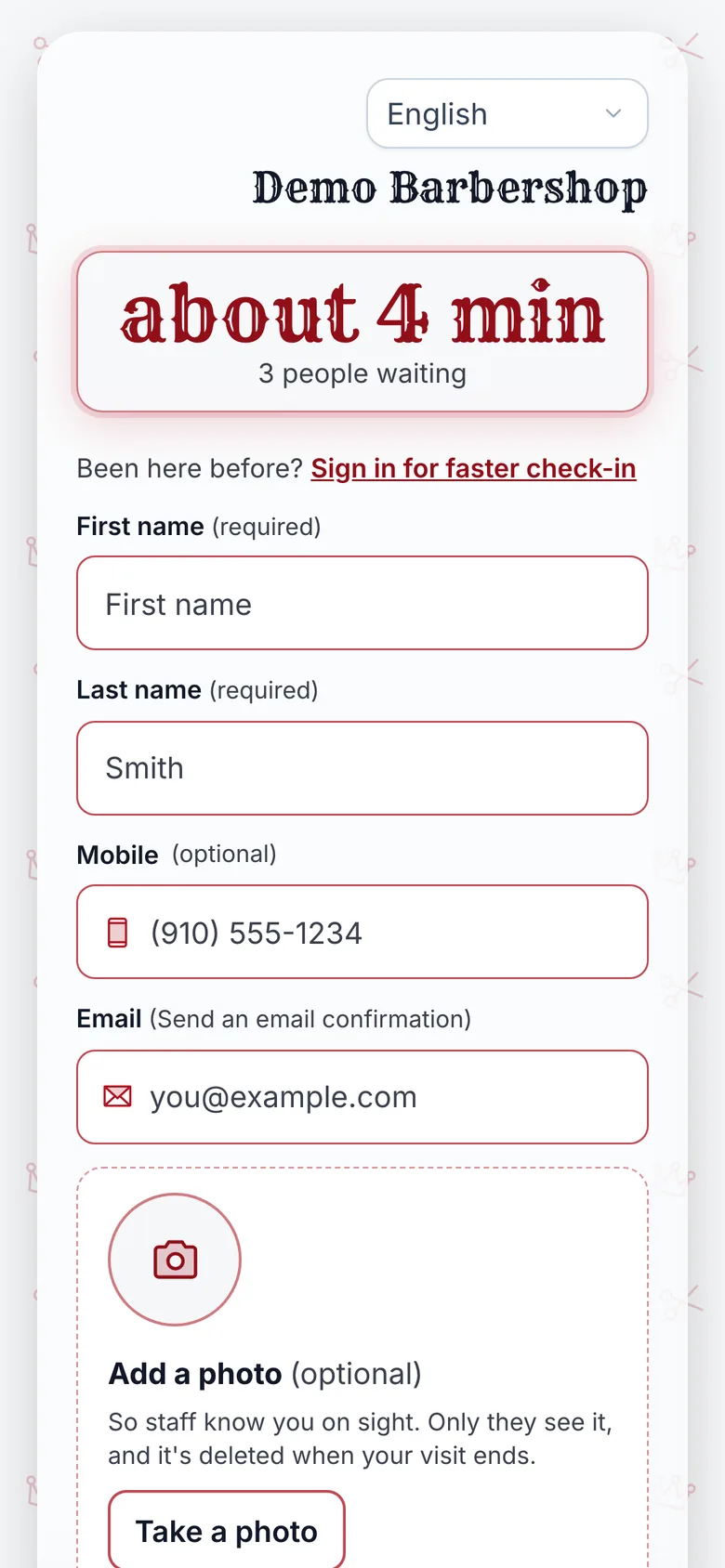
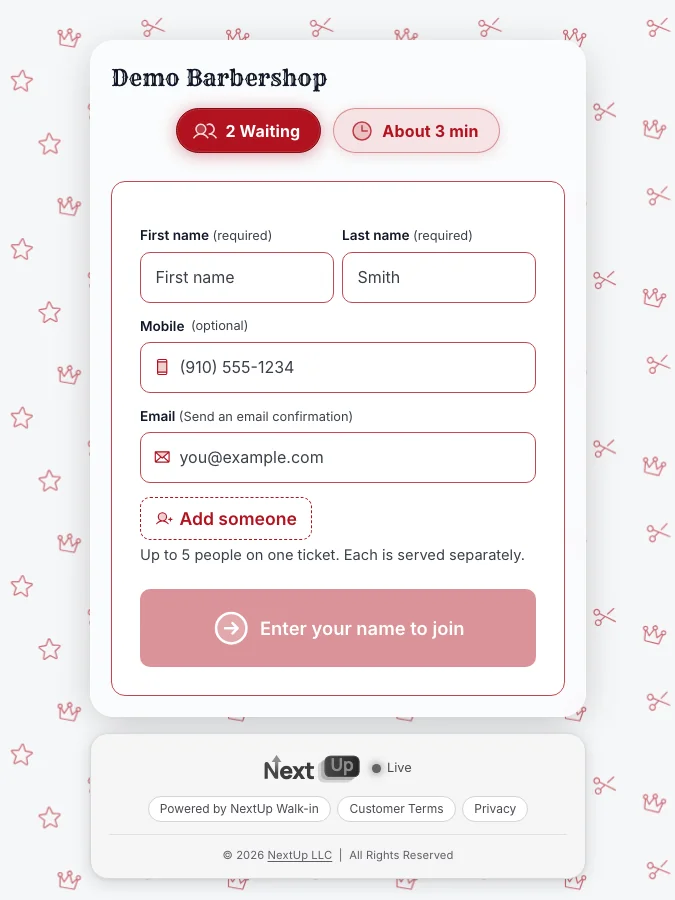
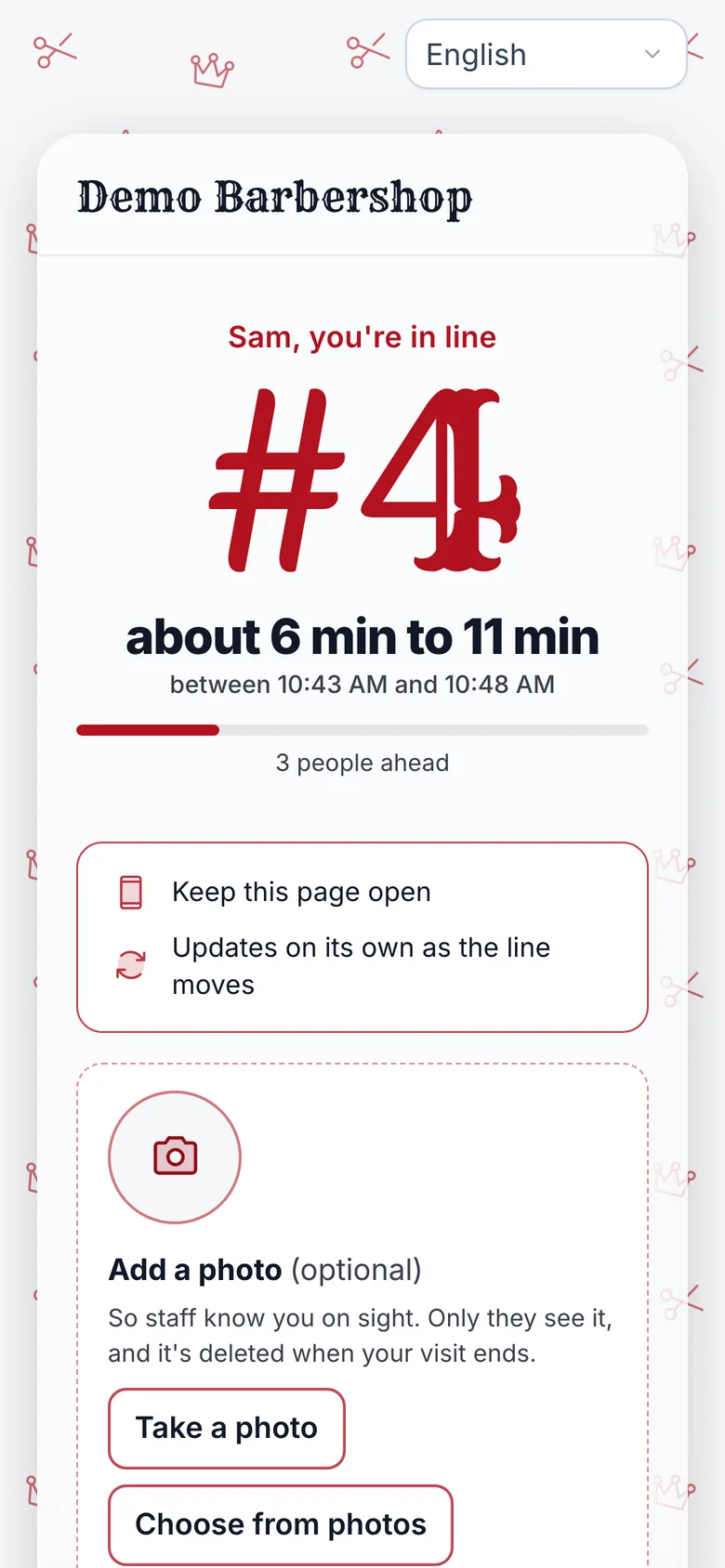
How NextUp Walk-in runs Thanksgiving weekend
The line, the lobby TV and the Door Tablet are on every plan, Free included. Free covers 1 location, 1 team member and 50 check-ins a month, no card needed. Checkout and card payments are included, including Tap to Pay on Android. Family tickets are on the Walk-in plan, which starts at $29 a month for your first location and includes 3 team members per location. Every paid plan starts with a 14-day free trial with every Pro feature, once per business. A card is needed to start, but nothing is charged until the trial ends, when the plan is charged unless you cancel first.
See the holiday rush plan, holiday hours on Google, family haircuts, Small Business Saturday, NextUp Walk-in for barbershops, the line and TV, the Door Tablet, pricing.
See it on your own line
Free needs no card: pick it at sign-up. The 14-day trial has every Pro feature, once per business. A card is needed to start, but nothing is charged until the trial ends, when the plan is charged unless you cancel first.
A calm walk-in line for a busy barbershop weekend
The NextUp app
- Guests join from a QR code or the Door Tablet, with no app and no account, and watch their place and wait on their own phone.
- A line cap pauses online check-in when you are full, and joining opens again as you serve people.
- Close for walk-ins automatically at closing time, or earlier with a close lead time, so the last cut can finish.
- Their first name and last initial come up on the lobby TV when you call them. The TV and the Door Tablet are on every plan, Free included.
- Family tickets are on the Walk-in plan. <strong>Visit texts</strong> are on paid plans, and only for customers who agree.
Free needs no card: pick it at sign-up. The 14-day trial has every Pro feature, once per business. A card is needed to start, but nothing is charged until the trial ends, when the plan is charged unless you cancel first.
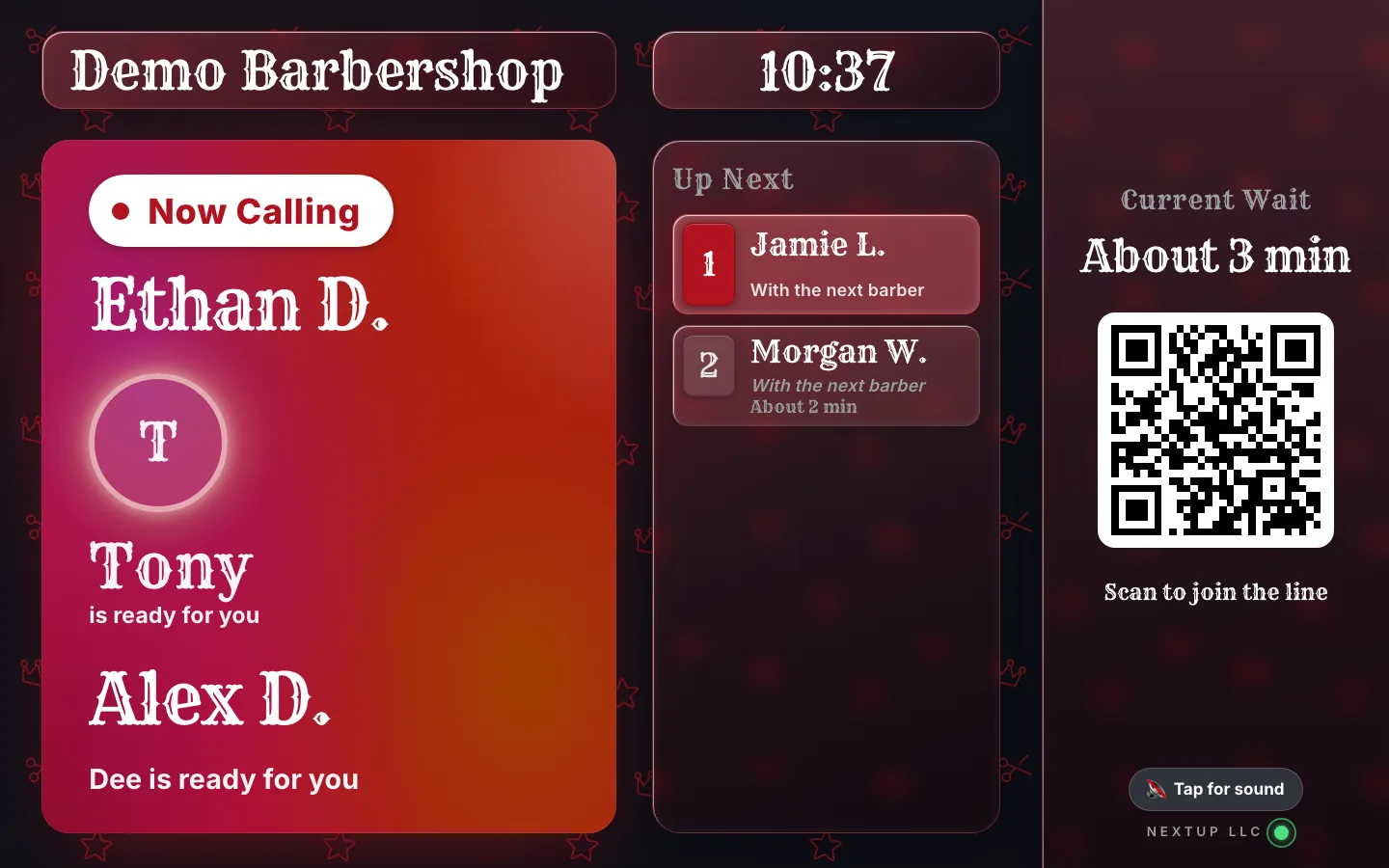
Be ready before Wednesday
Set up the weekend line before Wednesday.
The line, the lobby TV and the Door Tablet are on every plan, Free included. Print the QR sign, set a cap, and run a test walk-in this week.
Free needs no card: pick it at sign-up. The 14-day trial has every Pro feature, once per business. A card is needed to start, but nothing is charged until the trial ends, when the plan is charged unless you cancel first.
Questions
Is this the same as the holiday rush plan?
No. The holiday rush plan covers Thanksgiving through New Year’s for walk-in shops in general: the dates, hours, wait math and gift cards. This post is the barbershop walk-in queue for Thanksgiving weekend and Black Friday: the cap, the close, the lobby TV and the line on the day.
What does a line cap do?
You set the maximum number of people waiting, from 1 to 500, or leave it at no limit. When the line reaches that number, online check-in pauses. People who try to join see that you are at capacity and should check back soon. Joining opens again as you serve people.
Can I close the line before we lock the door?
Yes. Turn on "Close for walk-ins automatically" and set a close lead time, up to 240 minutes before closing, so the last cut can finish. People already in line stay in line, and staff can still add someone by hand. You can also switch the location to Closed at any time if you need to stop new joins early.
Are family tickets on the Free plan?
No. Family tickets are on the Walk-in plan, or you can try them in the 14-day trial. The line, the Door Tablet and the lobby TV are on every plan, Free included.
Is the lobby TV on the Free plan?
Yes. The TV display is on the Free plan, along with the Door Tablet and the line itself. Free covers 1 location, 1 team member and 50 check-ins a month.
Do customers get a text when it is their turn?
On paid plans, customers who agree to texts get a text confirming their spot and another when it is their turn. Free has no texts. On every plan, their phone page and the lobby TV show the moment they are called.
iPhone, iPad, Android and TV
Get the NextUp app
Run your line from your phone, wherever you are in the shop. Free for iPhone, iPad and Apple TV on the App Store, and for Android phones, tablets and Google TV on Google Play.
Ready to try it?
NextUp Walk-in is a walk-in queue for barbershops, salons, restaurants, and service shops. Customers join from the phone they already have. No app required. The trial is 14 days, with every Pro feature.