Buying Guide
How to choose a walk-in waitlist app: a buyer’s guide (2026)
Most waitlist apps look alike on a pricing page and behave very differently on a busy Saturday. Here is what to check before you choose, for any shop that takes walk-ins, and where the NextUp app fits.
The checklist, in one table
Six things decide whether a waitlist app works in a walk-in shop. Check each one on the vendor’s own pages before you sign up.
Six checks for a walk-in waitlist app
| Join with no app download | Every extra step loses a walk-in at the door | ✓ QR code, link or door tablet |
|---|---|---|
| Lobby TV display | Stops “am I next?” and shows the line is moving | ✓ Every plan, Free included |
| Door tablet | Catches people who won’t scan a code | ✓ every plan, Free included |
| A wait that knows who is working | A quote from a fixed number drifts | ✓ by service and team member |
| Checkout with tips | No second tool or second bill | ✓ every plan, Free included |
| Appointments beside the line | One calendar, so walk-ins never double-book | ✓ on Pro |
Check each one on the vendor’s own pages before you sign up.
Our pick for most walk-in shops
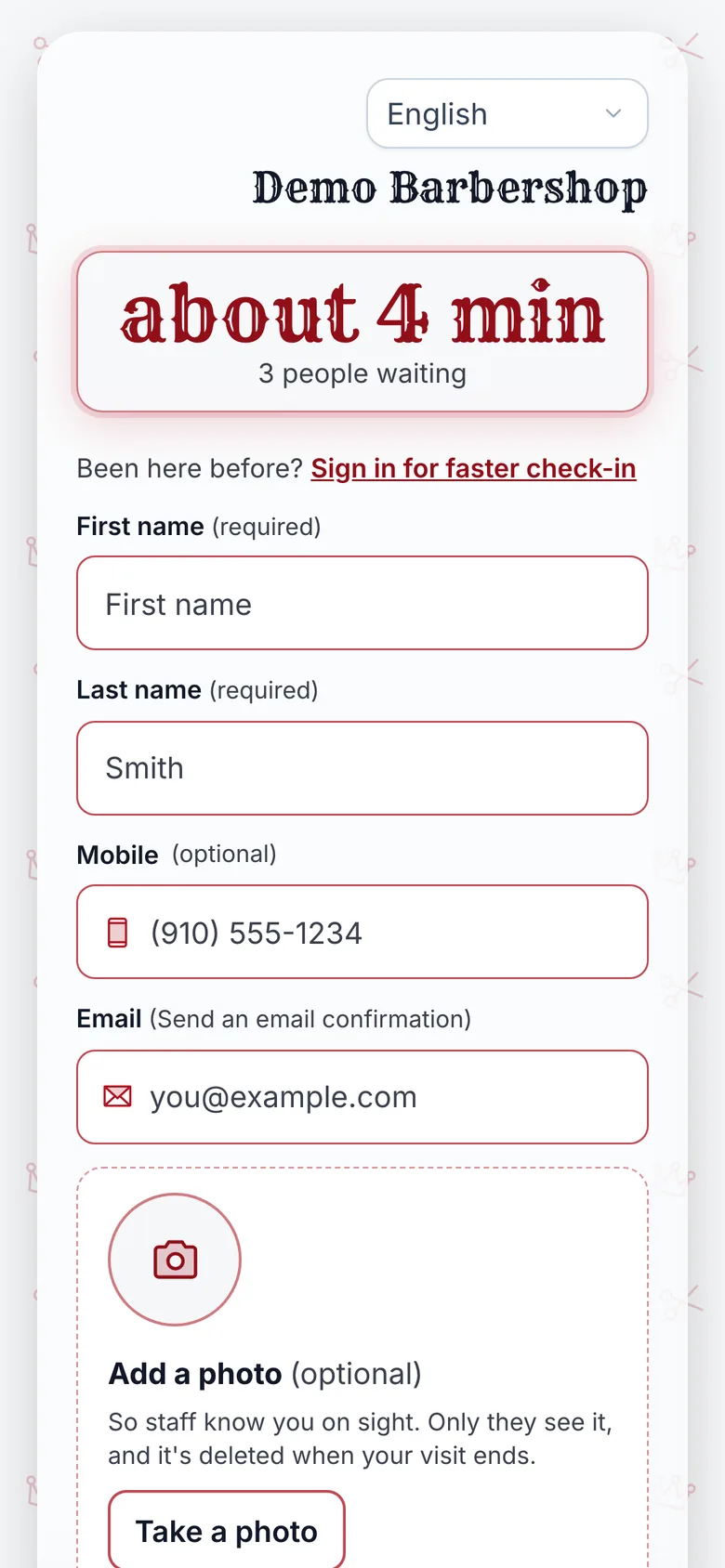
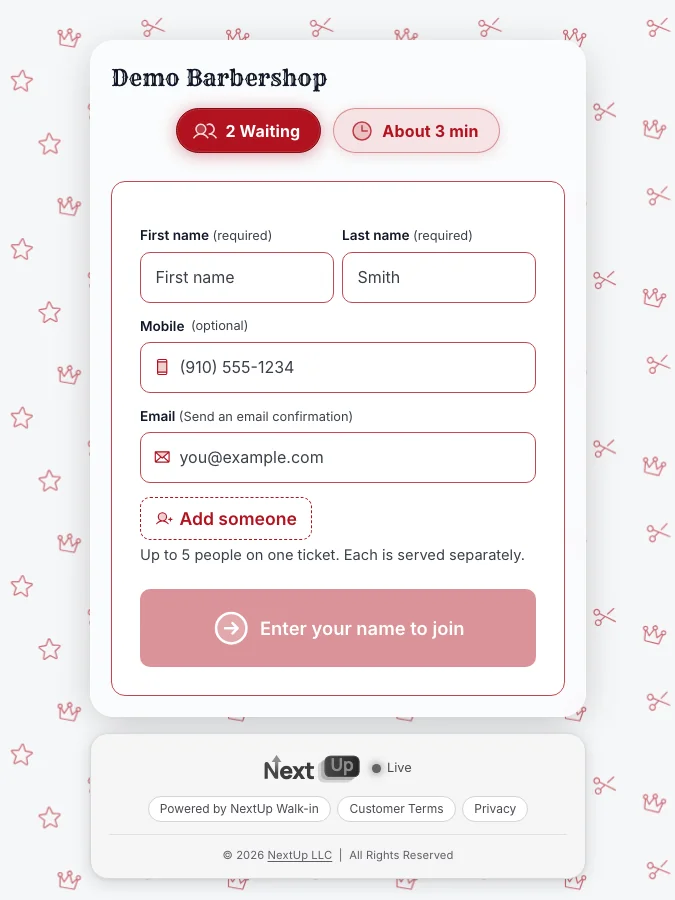
Built for walk-ins, in any trade
The NextUp app
- The lobby TV calls the next customer, on every plan, Free included.
- Customers join from the door with a QR code, your link or the door tablet, and no app.
- A live place and wait on the customer’s own phone, so they can step out.
- Checkout with tips: cash, a pay link or a Stripe card reader, and the card fee is never on tips.
- Appointments and online booking beside the line on Pro.
Free needs no card: pick it at sign-up. The 14-day trial has every Pro feature, once per business. A card is needed to start, but nothing is charged until the trial ends, when the plan is charged unless you cancel first.
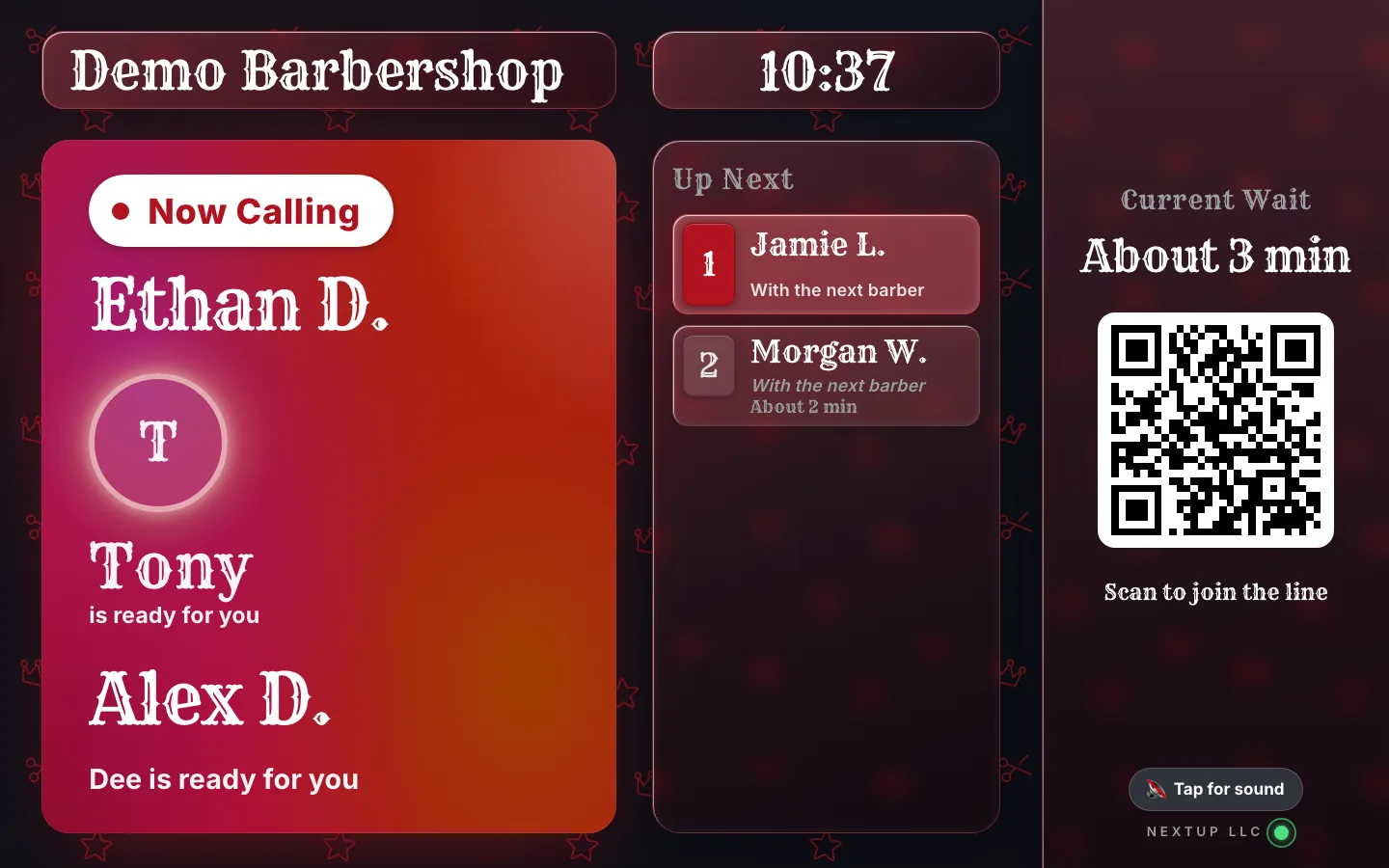
The screens behind a calm shift
The customer’s phone is the waiting room. They scan the code at the door, pick a service and a team member or anyone, and watch their place live.
The TV does the calling. When someone is free, the next first name and last initial goes up in the lobby.
See the TV display and the door tablet.
Your team calls from the Staff Screen. One tap on Call next updates the TV and the customer’s phone together, from any phone or tablet.
How waitlist apps price
The headline price rarely matches the bill. Some apps charge per location, some sell texts as credits on top, and some price by messages or users. Free tiers usually cap visits or leave out alerts.
Price your real month. Count customers per week, locations and team size, then add text overages, extra staff and any separate payment tool you would still need.
The NextUp app is $29 a month on Walk-in for a first location and $19 for each extra, or $59 and $39 on Pro, with 3 team members included per location, then $10 each.
NextUp Walk-in’s card fee is 0.5% of card payments, never on tips, at most $1 a payment, on top of Stripe’s processing fee.
See pricing. There is also a Free plan: 1 location, 1 team member and 50 check-ins a month, and no card needed.
What the plans come to for your shop
Enter your locations and everyone who works the line or the chairs. The sum uses the published plan prices and the team-member charge after the included ones.
- Walk-in, per month
- $49
- Pro, per month
- $79
- Paid team seats
- 2
- 3 included across 1 location
- Walk-in, billed yearly
- $490 a year
- Walk-in
- Pro
Hover or tab to a column for the numbers.
| Walk-in | Pro | |
|---|---|---|
| 1 | $29 | $59 |
| 2 | $29 | $59 |
| 3 | $29 | $59 |
| 4 | $39 | $69 |
| 5 | $49 | $79 |
| 6 | $59 | $89 |
| 7 | $69 | $99 |
| 8 | $79 | $109 |
| 9 | $89 | $119 |
| 10 | $99 | $129 |
| 11 | $109 | $139 |
| 12 | $119 | $149 |
Example: the chart repeats the sum for a team of 1 to 12 people at each location.
Uses the plan prices on the pricing page: $29 (Walk-in) or $59 (Pro) for the first location, $19 or $39 for each extra, 3 team members included per location, then $10 a month each. Card fees and Stripe's processing fee are not included.
See it on your own line
Free needs no card: pick it at sign-up. The 14-day trial has every Pro feature, once per business. A card is needed to start, but nothing is charged until the trial ends, when the plan is charged unless you cancel first.
Questions to ask every vendor
- Can customers join without staff? From a QR code and a door tablet, with no app to download.
- Is every screen included? And does it run on a device you already own?
- What does an alert cost? Texts included, sold as credits, or not offered.
- How is it priced? Per location, per user or per message.
- Can the same app take payment and tips? Or will you still need a second tool.
- Do bookings live beside the line? If you take appointments, they should share one calendar.
For named, side-by-side answers, see our comparison pages.
Salons, studios and every other walk-in trade
A salon needs a wait that knows color from a trim. The NextUp app adds up each client’s own services and each stylist’s pace, and on Pro puts the line and the book on one calendar.
See how it is set up for hair salons, nail salons, barbershops, tattoo studios, auto shops and pet groomers. For barbershops in particular, our 2026 barbershop pick goes deeper.
Test it on a real shift
- Put the QR code at the door. Print it with the free QR window sign maker.
- Pair the TV. Open the NextUp app on an Apple TV, Roku, Fire TV or Google TV, or app.nextupwalkin.com/tv in a streaming stick's browser, then enter the code it shows in your dashboard.
- Call the next customer. Press Call next on the Staff Screen and watch the TV update.
Judge it on your busiest day, not a quiet one. Count how many joined, how many left before their turn and how close the quotes were.
Ready to try it?
Run your line from the door to checkout.
The line, the TV and the door tablet are on every plan, Free included. Set it up this week and run it on your busiest day.
Free needs no card: pick it at sign-up. The 14-day trial has every Pro feature, once per business. A card is needed to start, but nothing is charged until the trial ends, when the plan is charged unless you cancel first.
Questions
What should I look for in a walk-in waitlist app?
The NextUp app’s checklist: customers join from a QR code or door tablet with no app download, a lobby TV is included (it is on every plan, Free included with the NextUp app), staff call the next person from any phone or tablet, and checkout takes tips.
Then work out the true monthly cost, including alerts, extra staff and any separate payment tool.
How do waitlist apps usually price?
The NextUp app prices per location: $29 a month on Walk-in or $59 on Pro for a first location, with 3 team members included. Other apps price per location with a text allowance, with texts sold as credits, or by messages or users. Price each at your own volume, locations and team size.
Is the NextUp app built for walk-in businesses other than barbershops?
Yes. The NextUp app is built for any trade that takes walk-ins, including salons, nail salons, tattoo studios, auto shops and pet groomers. Walk-in is $29 a month for the first location and $19 for each extra, or $59 and $39 on Pro.

Founder of NextUp Walk-in and a software engineer with 20 years of building systems that have to work under pressure.
Ready to try it?
NextUp Walk-in is a walk-in queue for barbershops, salons, restaurants, and service shops. Customers join from the phone they already have. No app required. The trial is 14 days, with every Pro feature.