Walk-in runs your line. Pro adds appointments, memberships, commissions and payroll. Restaurant adds your floor. Priced per location, with no setup fees and no contract. Switch or cancel any time.
Free for one small line: 1 location, 1 team member, 50 check-ins a month, every app, no texts, no card.Start on the Free plan
Walk-in
Everything for a walk-in line: queue, screens, clients and payments.
Split the bill by seat, evenly, by items or by amount
Pending orders dashboard
Server assignment per table
Move orders between seats
Food and drink sales in your reports, by server
Station View
Unlimited team members
Free
$0/month
1 location
1 team member
50 check-ins a month (resets on the 1st)
Every app: check-in page, Staff Screen, TV Display, door tablet and phone apps
Checkout, tips and client profiles
Rebooking reminder emails
'Powered by NextUp Walk-in' shown
No card needed to start
Not on Free
Texts to customers
The website builder
API keys and webhooks
AI features
Insights beyond today, and report downloads
Pro and Restaurant features
The owner counts as the team member. At 50 check-ins, check-in pauses until the 1st and you're offered an upgrade. A card is taken only at checkout when you upgrade, and your one 14-day trial of every Pro feature starts then. US only. Free's limits can change on 30 days' notice.
Your team. Walk-in and Pro include 3 team members at every location, counted across your business. Each one after that is $10 a month ($100 a year on yearly billing). Restaurant has no limit.
14-day free trial with every Pro feature, whichever plan you pick. A card is needed to start, but nothing is charged until the trial ends, when the plan is charged unless you cancel first.
Not ready for a trial? Try the demo, a shop that is already set up, with no sign-up and no card.
What's in each plan
Tap or hover a card for the details.
In every paid plan
Free has every app (check-in page, Staff Screen, TV Display, door tablet and phone apps), checkout, tips, client profiles and rebooking reminders too, within its limits.
The lineUnlimited visits
Your price is per location, not per customer. A quiet Tuesday and a packed Saturday cost the same.
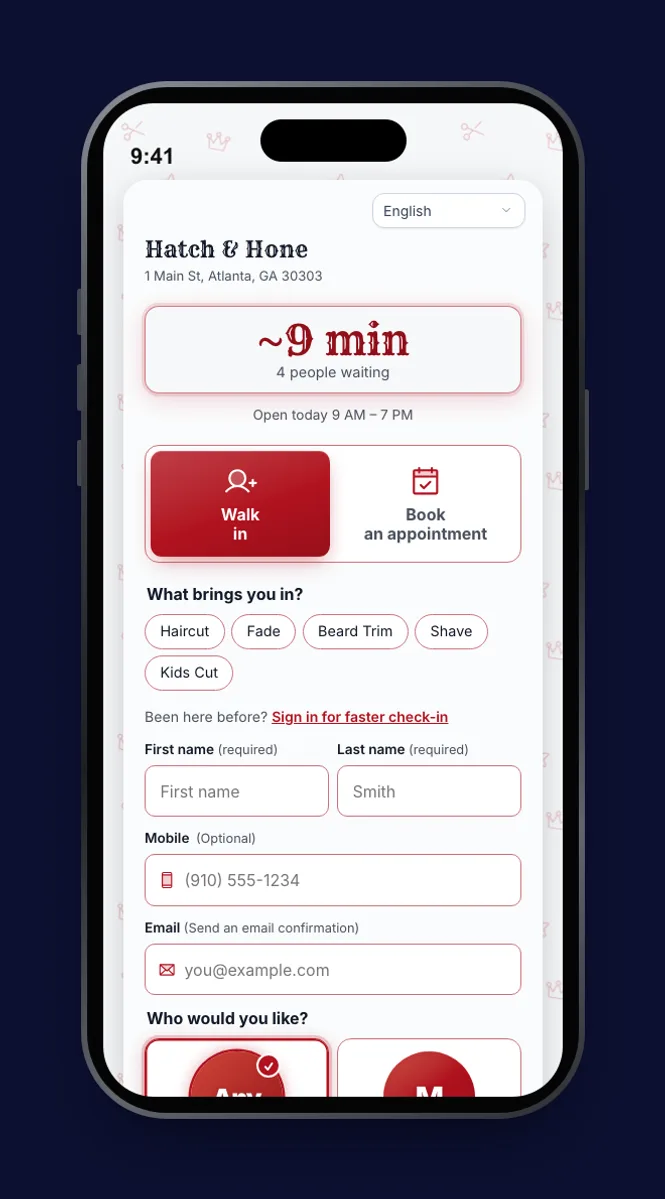
Customers join by scanning your QR code, with no app and no account
A name is all they need; phone and email are optional
Set a limit on how many can wait at once (1 to 500), or leave it open
Customers can say if they’re waiting inside, outside or in their car, and staff see it on the ticket
Live everywhereSix screens, one live line
Everyone sees the same line, updated the moment someone joins or is called. Call the next person once and every screen follows.
Customer phone: their place in line and a live wait, so they can step out
TV: who is being called, who is next, the wait and a code to join, with a chime
Door Tablet: customers type their name in; the screen resets for the next person
Staff Screen: call, start and finish visits; opens with the location's PIN
Queue Status: a public link to your live wait, to share before anyone leaves home
Station Screen: a private screen for each team member that finishes one client and calls the next (not for restaurants)
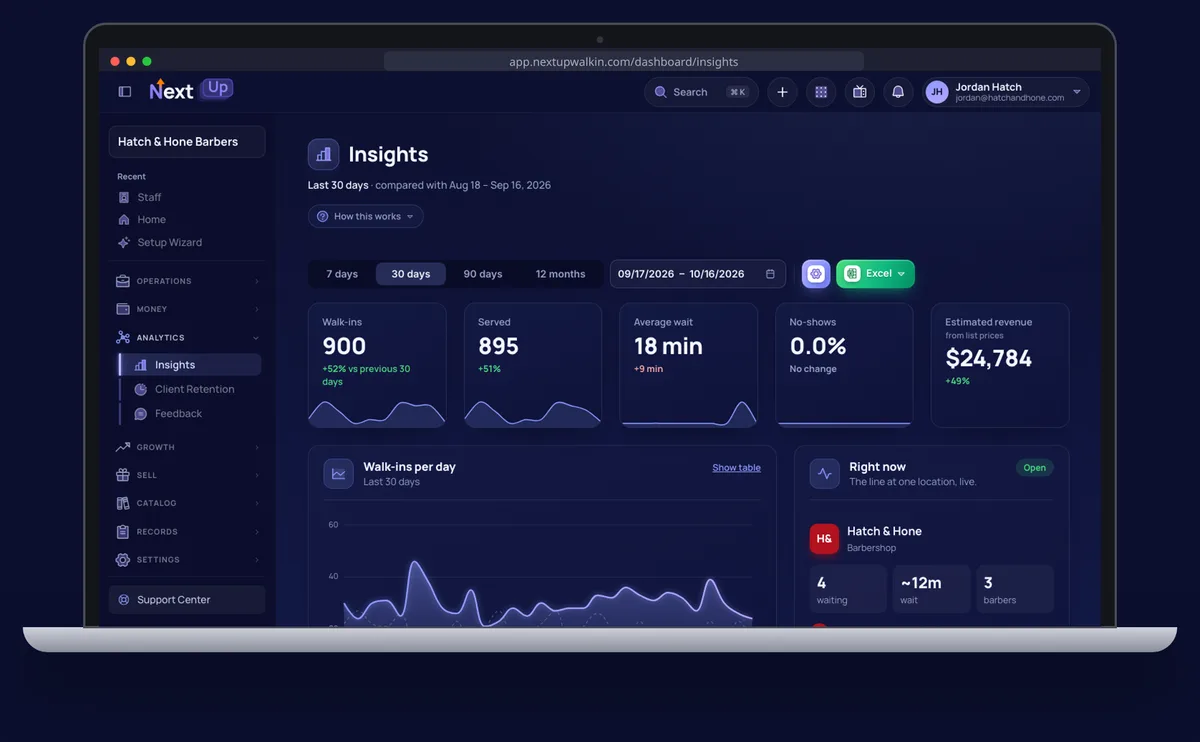
Run it all from the owner dashboard: locations, team, services, branding and Insights
Add a client by hand, or import up to 50,000 from a spreadsheet or contacts file
Clients you add or import get no texts or campaigns until they check in and agree (the one-time Pro email list import sends a welcome email with an unsubscribe link first)
CheckoutTake payment when the visit is done
Check out a visit and take payment in cash, by a pay link or QR code the customer pays on their phone, with their saved card, or on a Stripe card reader at the counter.
A Stripe card reader at the counter (S700, or a WisePOS E you already have), or an M2 paired to a phone in the NextUp app
Tips added at checkout go to whoever earned them
Stripe's own fee, plus NextUp Walk-in's 0.5% card fee: never on tips, at most $1 a payment
Cash and gift-card redemptions carry no fee
Branded receipts by email, with a PDF to download or print
Card tips land in your own Stripe account with only Stripe's fee taken out (NextUp Walk-in's card fee never touches a tip), and show on each person's statement for you to pay.
Choose when a client is due back, from 7 to 365 days, and NextUp Walk-in emails them a reminder in your words. If they've already been back, it isn't sent.
Set per location
Only to clients who left an email and agreed to hear from you
Once per visit, with an unsubscribe link
Your team3 team members per location, included
Every Walk-in and Pro location includes 3 team members, counted across your whole business. Each one after that is $10 a month ($100 a year on yearly billing). Restaurant includes unlimited team members.
Two locations include six team members, three include nine, and so on
Add or remove someone and the bill follows, prorated
Three access levels: owner, manager and staff
Team members can have their own sign-in for their book, clients, pay and schedule
The shared Staff Screen opens with one PIN per location
Every theme, with your own accent color
Your brandEvery customer screen looks like you
Pick a theme, set your accent color and fonts, and add your logo. Every customer screen updates the moment you save.
14 themes: 7 light and 7 dark
58 heading fonts, a body font and sizes you can adjust
Your accent color, checked for contrast so text stays readable
On the Check-in Page, TV, Door Tablet, status page and emails (and the booking page on Pro)
A small “Powered by NextUp Walk-in” line shows on Walk-in; Pro can remove it
Main St Barbers
~15 min
3 people waiting
Join the line →
Your websiteA live wait on your website
Paste one line into your site and visitors see whether you are open, about how long the wait is, and a button to join the line, in your colors.
Every business on a paid plan gets a draft website with an address ending .nextupshops.com. It shows your live wait, services and prices, team and hours straight from your account, so it stays up to date on its own. Nothing goes live until you press Publish.
A gallery of style kits, your choice of fonts, a layout for every section, ready-made pages (Locations, Team, Services, Contact, Gallery) and up to 20 pages
A search title and description for each page, a sitemap, and Google Search Console verification
Up to 2 of your own domains with automatic https; the booking times block needs Pro
$19 a month ($190 a year) per business, all locations included
NotificationsWeb Push notifications
After joining, customers can allow notifications in their browser. When it's their turn, they get one, even with the page closed.
No app to install
Works alongside texts, or on its own
Apps · iPhone, iPad, LG and Samsung apps coming soonNextUp apps for phones and TVs
The dashboard and Staff Screen as an app, a client app in your colors for the regulars you invite, and the waiting-room display as a native TV app. Everything also runs in a browser.
Push notifications for you and your team in the NextUp app (Android now, iPhone coming soon)
Clients join, message your team (and book, on Pro), from your own app link
Apple TV, Roku and Fire TV apps pair with a short code from your dashboard
Joining the line never needs an app
The lineWaits customers can plan around
The Check-in Page does more than quote a number: it shows the best time to come today, each team member’s own wait, and lets customers ask to hear when the wait is shorter.
Best time to come today: the lowest expected wait by quarter-hour, from the same weekday over 8 weeks and the live line
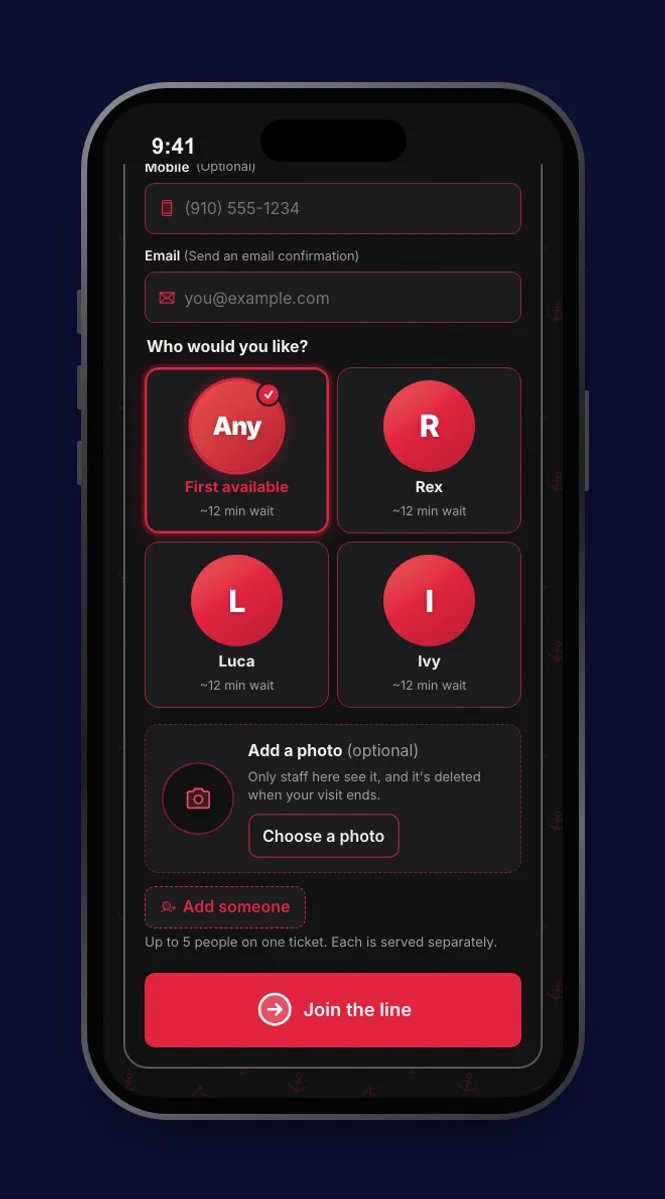
When customers choose a team member, each one’s own wait, plus First available
A "Tell me when the wait is shorter" alert when the wait is over 10 minutes (by email)
Call-time ranges ("called in about 15–25 min") from your real service times
When a sister location’s wait is much shorter, customers are offered a move there; never automatic
The lineFamily and group tickets
One check-in for a parent and the kids, or a group of friends. Each person gets their own place and their own service.
Add up to 5 more people on the join form
Every type except restaurants, which keep party size for a table
Customers say where they’re waiting: inside, outside or in their car
For customersRead it in their language
Customer screens come in English, Spanish, Vietnamese, Korean, Portuguese (Brazil), Haitian Creole and Simplified Chinese.
The non-English languages are machine-drafted; tell us what to fix
An "Includes" list under each service, wherever customers pick it
On the floorA hands-free "Done, next" button
Give each team member a secret link to open on a cheap phone or tablet at their station. One tap finishes the current client and calls the next.
One link per team member, shown once as a URL and a QR code
No sign-in or PIN to type with gloves on
Not for restaurants
Your teamA page for each team member
Every team member with a booking handle gets a public page: their photo, their role in your business’s own words, their services with prices, and the live wait or a way to book.
Share it from their Instagram or business card
Appointments to book on it need Pro
Licences and insurance per person, with expiry reminders
ComplianceLicences, insurance and a cleaning log
Keep each team member’s licences and insurance with expiry reminders, and tick off a per-location cleaning checklist each shift. Both start from a list for your type of business.
Licence types for all 16 kinds of business
A starter cleaning checklist per business type, printable for the wall or an inspector
Ticked off per shift, with who did it and when
CheckoutUnpaid bills, walkouts and close-out
Mark a visit "left without paying" and it follows the client to their next check-in. At closing time, the close-out shows who didn’t pay, money in by method and the difference against your count.
An Unpaid tab with Collect; one payment covers today’s bill and earlier unpaid ones
Splitting a bill takes three steps, with one tip per bill
A difference needs a reason before you close
ClientsLookbook: pick a look when you join
Add photos to the services you already list, in sections, with a sold-out mark. Customers pick a look on the join form, your team sees it on their ticket, and the TV can show your styles between calls.
Up to 12 photos per item; 300 photos per location on Walk-in, 1,500 on Pro
Named for your trade, like Flash & Portfolio for tattoo studios or Specials for restaurants
The pick is a note for your team: it does not change the service or the wait
Tick "First ever visit" and the client gets a printable, shareable certificate with your logo, their first name and the date.
In the business type’s own words, like "First haircut"
Every plan
In the waiting roomCall-up spotlight and accessible call-ups
Turn on a full-screen "You're up!" with the client’s first name, their team member’s photo and a chime. Between calls the TV can rotate the wait, flash sales, your Lookbook styles, recent 4–5 star reviews and, on the web TV, the best time to visit.
Spoken call-ups in English or Spanish, and a large-text, high-contrast view, on the web TV
The spotlight, chime and rotating wait, sales and review cards are also on the Apple TV and Roku apps
Reviews show only when public reviews are on
Getting foundAI assistants can find your wait
Assistants that support MCP, like ChatGPT and Claude, can look up your business, its live wait, services and hours, and send the customer to check in or book. It is read-only and needs no sign-in.
Copy-ready steps to add check-in or booking to your Apple Maps place card and Yelp page
Nothing for you to install or switch on
SecuritySecurity on every plan
The same protection whether you have one location or ten. Nothing to buy and nothing to switch on first.
Two-factor authentication with any authenticator app, plus recovery codes
Passkeys on the website: sign in with Face ID, a fingerprint or your device PIN, which counts as both factors (not yet in the phone apps)
Owner and manager roles, enforced on the server
An audit trail of who changed what, kept for 3 years
Encrypted in transit (TLS 1.2+) and encrypted backups every 6 hours
Each new location is $19 a month on Walk-in, $39 on Pro or $44 on Restaurant, charged only for what's left of the current cycle.
Each location has its own line, screens, QR code, settings and texts
Each Walk-in or Pro location adds 3 more included team members
Remove a location and your bill goes down
Each location after the first costs less than the first
BillingCancel in a couple of clicks
No phone call, no email, no contract. Cancel from Manage billing and keep full access until the period ends.
Only owners can change the subscription
Afterwards the business moves to the Free plan: nothing is deleted, one location keeps taking up to 50 check-ins a month, and the rest is kept and paused until you subscribe again
Added in the Pro and Restaurant plans
AppointmentsAppointments beside the walk-in line
Customers pick a service, a person (or anyone) and an open time from your Check-in Page. Booked visits count in the walk-in wait, so quotes stay honest.
Reminders 24 hours and 1 hour before
Customers reschedule or cancel themselves, up to 2 hours before
Hours and time off per person, and Google Calendar if they connect it
Repeating visits: weekly, every two weeks or monthly
A canceled time goes to the first walk-in it fits, and a waitlist for openings tells people when a full day frees up
Ask for a card on file or a deposit when someone books. If they don’t show, staff can charge your no-show fee from the appointment. It’s never automatic.
Deposits are refunded on their own if they cancel before your cutoff
Customers see the deposit and the cutoff before they pay
Paid by card: Stripe's fee and NextUp Walk-in's 0.5% card fee (at most $1) come out of each payment
The staff screen's On duty switch records each shift. At pay time, export hours, commission, tips, cash tips and advances in your payroll provider's format.
Gusto, RUN Powered by ADP, ADP Workforce Now or QuickBooks Payroll
Checks before you export: missing IDs, open shifts, unsent tips
Shifts left open are closed at closing time and flagged
See clients past their own usual gap with nothing booked, most overdue first, and reach out in a tap. At checkout, Book their next visit offers the three open times nearest the client’s rhythm.
Not for restaurants or service counters
Booking the next visit is for types that take appointments
Smart "anyone" bookings can place an "anyone" appointment with the best free team member (an owner switch per location, off by default)
LoyaltyStreaks, tiers and client referrals
Reward clients who come back on schedule with streaks and tiers on top of the punch card. Turn on client referrals and a friend’s first visit earns them a discount and the referrer store credit.
Referrals are off until you turn them on and fund them yourself; the default is $5 off and $5 store credit
Add up to three photos and a note to a visit from the Staff Screen. When that client is called next time, their last visit is on screen.
Works for every business type: a cut, a colour, a tune-up, a groom
Clients can see their own visit photos
InsightsOwner insights that suggest what to do
Ask a plain-language question about your own numbers. Compare your median wait, no-show rate, rebook rate and average ticket with businesses of your type and size. See how many people to have on each open hour, and the themes in your reviews.
Ask about your business answers questions from your own data, for owners and managers
How you compare uses the last 90 days against businesses of the same type and size
Suggested team on duty: people needed per open hour for the next 7 days, on the Hours page
Review themes: top praise and complaints from 90 days of feedback, with a suggested reply per comment
Set monthly targets for each team member, like visits, average ticket, product sales or review rating, and choose whether the team sees a leaderboard.
Progress comes from your real visits
Off until an owner turns it on
Estimate your cost
Pick a plan, then set your locations and your team.
1 location
4 team members
NextUp Walk-inWalk-in
$39/month
Walk-in, 1 location$29
1 more team member × $10$10
Switch to NextUp Walk-in and save up to $480 a year*
The same setup, priced elsewhere
Typical booking appStarter, billed yearlyabout $50/monthSave about $11/mo with us*
Typical salon suiteStarterabout $79/monthSave about $40/mo with us*
Typical POS add-onPlusabout $49/monthSave about $10/mo with us*
*Estimates, our best effort at a fair comparison: their published prices for 1 location and 4 team members, checked October 2026. Not a quote; their actual pricing can differ, so check with them. Subscription only; card fees not included. Compare apps
Payment processing fees, in plain numbers
When customers pay by card through NextUp Walk-in (a pay link, a saved card, a card reader, a deposit or a table bill), Stripe processes the payment and charges its own fee, with nothing added to it. NextUp Walk-in adds a small card fee of its own, never on tips. Card payments through NextUp Walk-in are also screened for fraud with Stripe Radar — fraud prevention included in the platform, with no separate tool to buy or switch on.
0.5%
NextUp Walk-in's card fee
Small, capped at $1, and never on tips.
On top of Stripe's fee, NextUp Walk-in keeps 0.5% of each card payment, never more than $1, however big the bill. Tips carry only Stripe's processing fee. Cash, gift-card redemptions and booth rent carry no NextUp Walk-in fee.
Capped at $1
On top of Stripe's processing fee, NextUp Walk-in's fee is 0.5% of a card payment, never more than one dollar ($1). A $200 service and a $2,000 package carry the same $1 NextUp Walk-in fee.
Tips stay yours
NextUp Walk-in never charges a fee on tips. Only Stripe's processing fee applies, and you choose whether the tip or the business covers it.
Not on everything
Cash, gift-card redemptions, store credit you spend and booth rent carry no NextUp Walk-in fee. It only ever applies to card payments.
No booking fee
Your clients pay no booking fee to book with you online.
What happensFeeWho pays it
Card paymentA US card, online or saved: tips, bills, deposits, no-show fees, memberships, rent2.9% + 30¢Comes out of the payment. On tips, you choose: the tip or the business.
Card on a Stripe card readerTapped, dipped or swiped at the counter or on the M2 in the NextUp app2.7% + 5¢Comes out of the payment
Card issued outside the USStripe adds 1.5% to its card fee. NextUp Walk-in's fee doesn't change+ 1.5%Comes out of the payment
NextUp Walk-in's card feeOn card payments you take through NextUp Walk-in. Never on tips, cash, gift cards or rent0.5%, at most $1Comes out of the payment, not the tip
Rent paid from a US bank accountLower than a card; takes a few days to clear0.8%, at most $5Comes out of the rent
Rent taken off a renter's statementTaken off what the business owes the renterNo fee—
A refundStripe keeps its original fee; NextUp Walk-in's fee on the refunded part is returnedStripe's fee keptThe business
A dispute (chargeback)When a customer disputes a charge with their bank$15The business
A $20 tip by card$19.12 to your team memberStripe's fee: $0.88. No NextUp Walk-in fee on tips, and the full $20 if the business covers tip fees.
A $50 deposit by card$48.00 to youStripe's fee: $1.75, plus NextUp Walk-in's 0.5%: 25¢
A $300 bill by card$290.00 to youStripe's fee: $9.00, plus NextUp Walk-in's fee: $1 (the cap)
$1,400 monthly rent by bank$1,395 to youStripe's fee: $5 (the cap). No NextUp Walk-in fee on rent
Stripe's standard US rates as of October 2026. Stripe sets these rates and can change them; the current ones are at stripe.com/pricing. Every fee, Stripe's and NextUp Walk-in's, shows on your payout records and exports. These fees apply only to payments you take through NextUp Walk-in, online or at the counter. Money you take another way, like cash, your own card machine, or Venmo or Cash App sent straight to you, never passes through NextUp Walk-in, so nothing comes out of it for us or Stripe.
Billing questions
Is there really a free trial?
Yes — 14 days, with every Pro feature, whichever plan you pick, once per business. A card is needed to start, but nothing is charged until the trial ends, when the plan is charged unless you cancel first. If you cancel before then, you are not billed. Or start on Free with no card: 1 location, 1 team member and 50 check-ins a month.
What is the difference between Walk-in, Pro and Restaurant?
Walk-in has everything for running a walk-in line: the queue, the staff screen, the TV and door tablet, client profiles, rebooking reminder emails (on every plan, Free included), checkout and card payments, tips and team pay statements, insights and reviews, wait forecasts, family tickets, customer screens in six more languages, team member pages, licences and a cleaning log. Pro adds appointments and online booking, deposits and no-show fees, memberships and packages, gift cards, store credit, loyalty punch cards, commissions, payroll and the time clock, tip pools, booth rent, cash advances, email campaigns with a one-time email list import, automated win-back and no-show follow-up journey emails, flash sales, visit photos, one-tap rebook, overdue regulars, loyalty tiers, client referrals, team goals, how you compare, a suggested team on duty, review themes, Ask about your business and smart “anyone” bookings. Restaurant has everything in Pro, plus the floor plan, QR ordering and payment at the table, with no limit on team members.
How do team members count?
On Walk-in and Pro, every location includes 3 team members, counted across your whole business: two locations include 6, three include 9. Each team member after that is $10 a month, or $100 a year on yearly billing. Add or remove someone and your bill follows, prorated. Restaurant has no limit and no charge for team members.
Does NextUp Walk-in take a cut of my payments?
A small, capped one. On each card payment you take through NextUp Walk-in, Stripe charges its own processing fee, with nothing added to it, and NextUp Walk-in's card fee is 0.5%, at most $1 a payment. It is never charged on tips, cash, gift-card redemptions, store credit spent or booth rent.
What happens if my trial or subscription lapses?
Your business moves to the Free plan. Nothing is deleted: one location keeps taking up to 50 check-ins a month with one team member, and everything above Free's limits (other locations, team members, texts and Pro features) is kept and paused until you subscribe again. If a renewal payment fails, everything keeps working for 7 days while you update your card.
Can I add locations later?
Yes, any time. New locations are billed at your plan's rate for each additional location and prorated for the time left in your billing cycle.
Can I switch plans?
Yes, any time, from Billing. The change takes effect straight away and is prorated: an upgrade is charged the difference for the rest of the billing period, and a downgrade leaves a credit for the unused part on your next invoice. Moving from Pro to Walk-in keeps what's already under way: booked appointments go ahead, members keep their memberships, gift card balances can still be spent and rent agreements carry on. You just can't set up new ones.
I'm switching from another app. Is there a deal?
Yes. Enter the code SWITCH on the checkout page where you add your card, on monthly billing, and your first paid month (after the free trial) is free. Coming from any other booking app, import your client list yourself in a few minutes. You see every row before it saves, and you can undo it for 7 days. Questions? Email support@nextupwalkin.com.
How do referrals work?
Copy your referral link from Billing and send it to another business. When they sign up through it, their first paid month is free on monthly billing. You get a credit worth one month of your plan, up to the amount of their first payment, once they start paying, for up to 12 referrals a year.
How do I cancel?
Cancel any time from your billing portal, powered by Stripe. There's no phone call or email required.
What uptime does NextUp Walk-in commit to?
A 99% monthly uptime target for signing in, joining a line and running the queue, set in the Terms of Service, with a credit on that month's subscription when a month falls short. How the line keeps running on a busy day.
Is it cheaper with lots of locations?
Yes: each location after your first costs less, $19 a month on Walk-in, $39 on Pro or $44 on Restaurant, and that rate holds however many you add, with no volume tiers to negotiate. Add up to 50 yourself from your dashboard; for more, email support@nextupwalkin.com and we'll raise your limit. Opening several at once? We'll help you set them up.
What owners say
We have a lot of barbers in the shop, and with a paper clipboard nobody could keep track of who was next or how long the wait really was. People would walk in, see the clipboard and a room full of people, and a lot of them, parents with kids especially, would figure it was going to take forever and walk right back out. And when someone asked a barber how long it would be, that barber often didn't know, so we'd give the wrong answer and lose them anyway. Now they check in on the kiosk, look up at the TV, or scan the QR code on our front window before they even walk in. Everybody can see where they stand. It finally feels like a modern shop.
Trinidad CorralesOwner, Fade Factor, Jacksonville NCTrinidad earns money from NextUp Walk-in.Read the full story
How much are abandoned visits costing you?
Some people who join a walk-in line are never served. They cancel, or the wait runs out. Enter your weekly visits, your walk-out rate and your average ticket.
Your shop
150
Per location, across all days. A busy barbershop might see 150–300.
10%
Example: 10%, change to match your shop. The share of people who join and are never served.
$35
Haircut, nail set, oil change, grooming session, etc.
1
NextUp Walk-in is $29/mo for the first, $19/mo each additional, with 3 team members included at each.
JOINED VISITS NEVER SERVED
$27,300
About 780 joined visits a year, at 10%, times your ticket. This is not recovered revenue.
Every Pro feature in the trial. A few minutes to put the first location online.
The walk-out rate is yours to set: the example is not a measured figure. People who never join are outside it. The result is an estimate from your inputs, not recovered revenue. Full calculator →