Product
Lookbook for barbershops: pick your cut when you join
Lookbook is a NextUp Walk-in feature that puts pictures on the services you already list. A walk-in can pick the cut they want from photos when they join the line, and the barber sees it on the staff screen before the customer sits down. Here is what it does today, and what comes next.
What Lookbook is
“Low fade, but not too low” is where a lot of haircuts go wrong. Customers show a photo on their phone at the chair, or describe it while the barber guesses. Lookbook settles that before they sit down.
It is a visual layer over your NextUp Walk-in service catalog, not a second list. “Mid skin fade + lineup” stays the service it is today, with its minutes and price, and gains photos and a section such as Fades, Tapers or Beards.
It is on every plan. Walk-in includes 300 photos per location and Pro 1,500, and the free trial has the Pro limits.
Setting it up
In the dashboard, open Catalog, then Lookbook. The page lists your services. Turn on the switch beside a cut to show it, then open it to add up to 12 photos (PNG, JPEG or WebP, up to 2 MB each, several at once), put them in order with the first as the cover, and add a caption to each. You can rename the feature for a location in its settings.
Give the cut a section, mark it sold out with one switch, and describe the cover photo in a few words, with an optional Spanish version. A cut shows to customers only once it has a photo.
Get a client’s okay before you post a photo of their cut. Public photos of children’s haircuts are best left out. NextUp Walk-in’s Terms do not allow sexually explicit uploads.
Pick your cut when you join
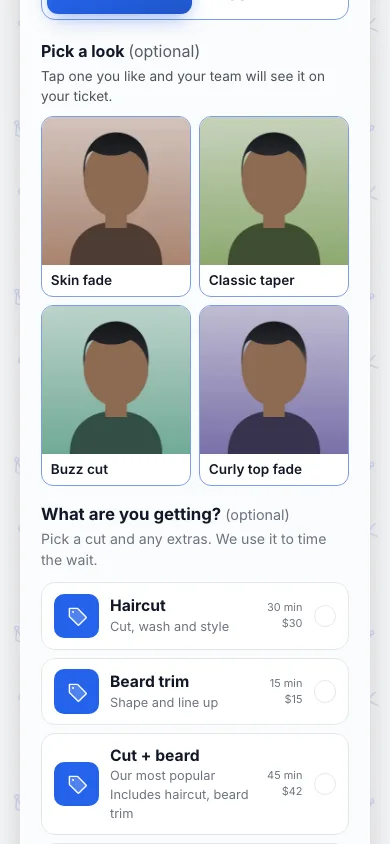
Once your Lookbook has cuts with photos, the join form shows an optional “Pick a look” grid. The customer taps the cut they want and joins the line. Your front desk sees the same grid when they use Add to line on the staff screen. Cuts marked sold out are not offered.
At the chair, the customer’s ticket on the staff screen reads “Wants: Mid skin fade” with a small photo, and a tap opens it bigger. No more passing a phone back and forth mid-cut. A Style button on the ticket changes the pick or clears it.
The pick is a note for the barber. It does not change the service or the wait estimate, and it is never shown on the TV or to other customers.
On the lobby TV
Turn on Rotating content under Branding, TV Display, and between calls the TV cycles your current wait and up to 8 of your cuts, one at a time, with the photo, name and price. Cuts marked sold out are left out. Our guide to managing walk-ins in a barbershop covers running the line itself.
Next
Not built yet: a Lookbook tab on your location page to browse by barber and style, add-ons such as a beard trim or hot towel shown beside each picture, a reference photo a customer can send, and a Lookbook view for the widget on your own website.
Want one of them sooner? Start the 14-day free trial, which has every Pro feature, and tell us what your shop needs. The barbershop page shows how the rest of NextUp Walk-in fits together.
Questions
Is Lookbook available now?
Yes, from October 14, 2026. In the dashboard open Catalog, then Lookbook, and add photos to your services.
Which plans have it?
All of them. Walk-in includes 300 photos per location, Pro 1,500, and the free trial has the Pro limits. Up to 12 photos per cut.
Does picking a cut change the wait estimate?
No. The pick is a note on the ticket for the barber. The service they chose still sets the minutes.
Who sees the cut a customer picked?
Your staff, on the staff screen. It is never shown on the TV or to other customers.